
A core for the MEGA65

The home computer from another timeline.

What if Commodore had seen Doom coming? The VIXEN‑32 is our answer: a 32‑bit home computer with a real custom chipset (blitter, copper, sprites, SID) built for chunky pixels and 3D. It runs today, on the MEGA65.

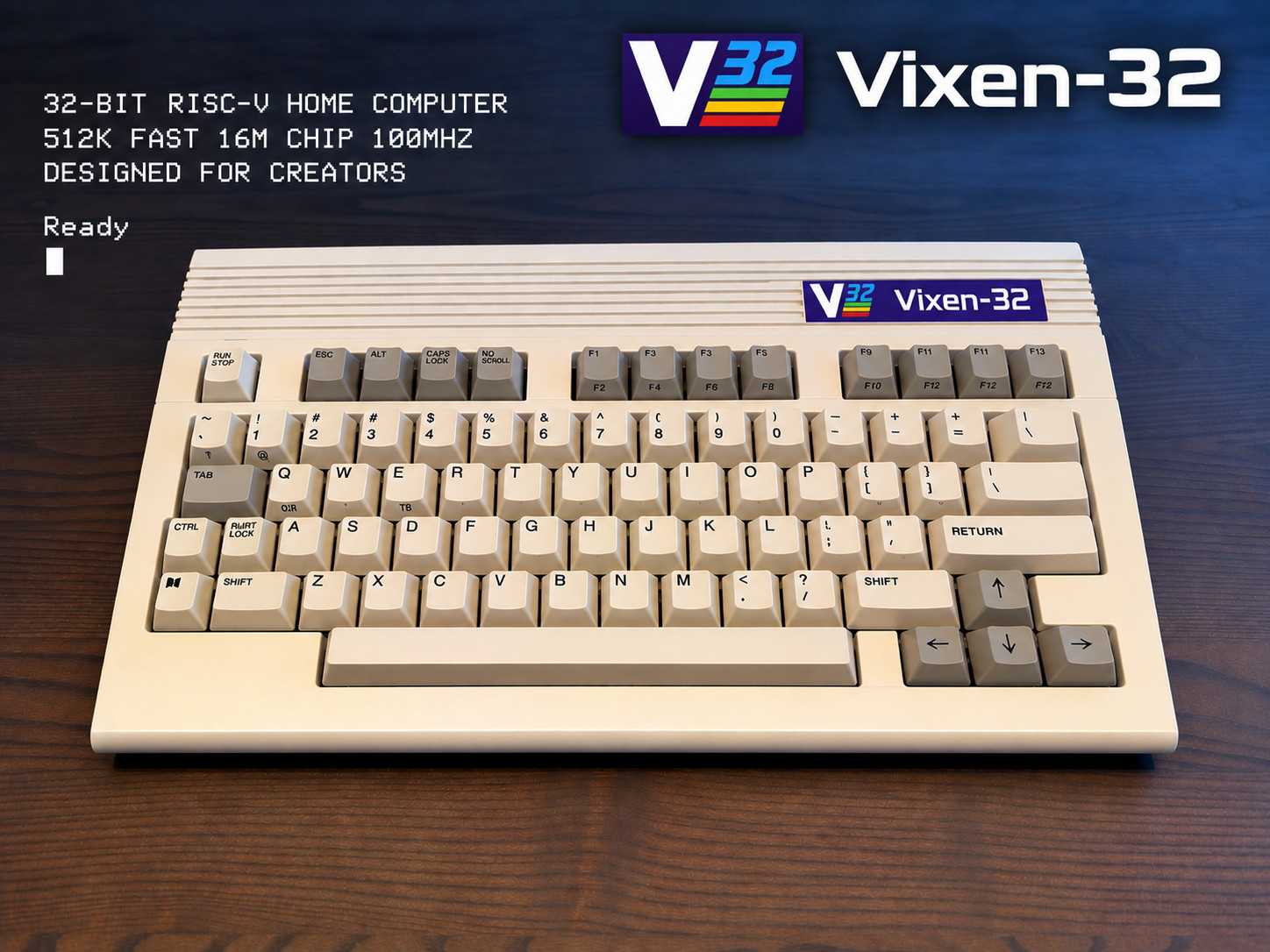
The VIXEN-32: a cream-colored keyboard computer with the V32 logo, and the boot screen text: 32-bit RISC-V home computer, 512K fast, 16M chip, 100 MHz, Ready.
This VIXEN‑32 is a modified MEGA65 case with the floppy drive taken out. A 3D‑printable version of the case is coming soon.
The story

The computer Commodore never built

History has a fork in it. This is the story of the other road, the one where the Amiga’s family saw the future coming, and got ready for it.

  1. 1985

    The Amiga arrives

    Commodore’s Amiga is years ahead of everything. It has helper chips that do the heavy work: a blitter that moves pictures by itself, a copper that changes the screen line by line, hardware sprites, and four channels of real sampled sound. For years, nothing comes close.

  2. 1990

    The PC learns to count to 256

    Ordinary PC graphics cards can now show 320 × 200 pixels in 256 colors, and every pixel is simply one byte in memory. Programmers call it chunky pixels. It sounds boring. It changes everything.

  3. 1992-93

    The walls start to move

    Wolfenstein 3D puts you inside a maze of textured walls. Then Doom adds stairs, light and shadow. Drawing a textured wall means painting one pixel at a time. That is easy when a pixel is one byte, and painfully slow on the Amiga, which spreads each pixel across up to eight separate “bitplanes”.

    The Amiga never catches up. In 1994, Commodore is gone.

  4. The fork

    But imagine…

    …that someone at Commodore sees it coming. Back in 1990, before the first textured wall ever moves, they make the call: the next machine keeps everything that made the Amiga magic, and changes the one thing that would kill it.

    Every pixel becomes one byte. 256 colors on screen, picked from 65,536. The blitter learns to paint textured walls and floors, whole triangles, and to remember how far away each pixel is: 3D, drawn by the hardware. The copper and the sprites stay. The SID sound chip stays too, and a 6502, so the C64 games still run.

  5. VIXEN-32

    Switch it on

    A blue screen. A blinking cursor. Ready. It feels like home, but under the keyboard is a machine made for the 3D games of the 1990s.

*** VIXEN-32 RISC-V ***

512K FAST 16M CHIP 100MHZ

DESIGNED FOR CREATORS


Ready

10 PRINT "HELLO, TIMELINE"

RUN

HELLO, TIMELINE


Ready

Switch on, type a line, RUN it.

That timeline never happened. So we built the VIXEN‑32 anyway, thirty-five years late, on the MEGA65. The one part we borrowed from the future is the processor: a modern 32‑bit RISC‑V running at 100 MHz.
What is it, really?

One computer. Many machines inside.

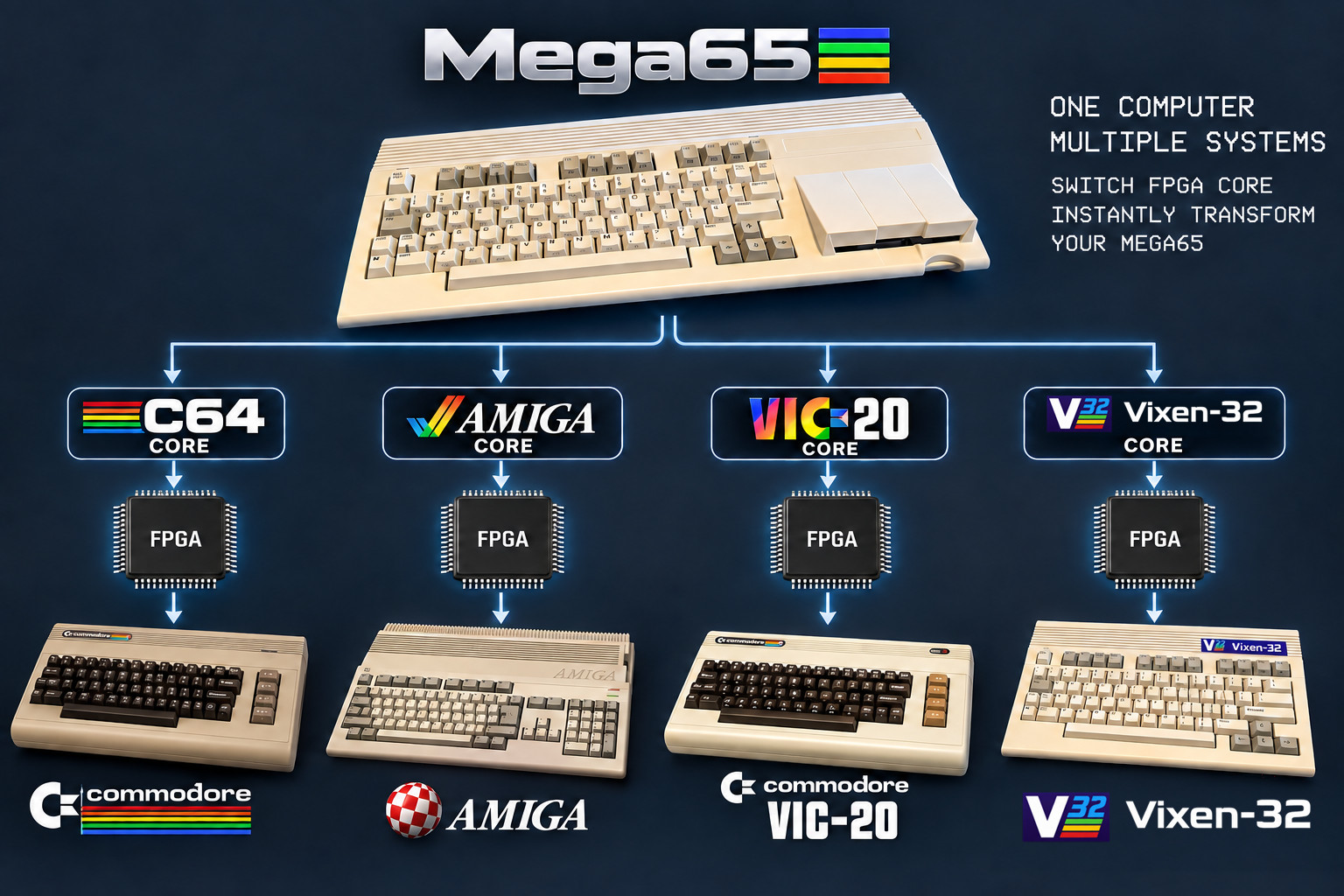
The short version: the MEGA65 is the computer on your desk. The VIXEN‑32 is one of the computers it can become.

Diagram: the MEGA65 at the top. Arrows lead to four cores: C64, Amiga, VIC-20 and VIXEN-32. Each core goes into the FPGA chip, and the MEGA65 becomes that computer: a Commodore 64, an Amiga, a VIC-20 or a VIXEN-32.
Switch the core, and the same MEGA65 becomes a different computer.
  1. The MEGA65 is a real computer

    A brand-new computer in the shape of the Commodore 65, the machine Commodore never released: keyboard, case, disk drive, ports. You can buy one today.

  2. Inside it is an FPGA

    A special chip that can rewire itself to become almost any other chip. Think of it as electronic LEGO.

  3. A core is the building plan

    Load a core, and the FPGA builds that machine out of real circuits: its processor, its graphics chips, its sound chip.

  4. Pick VIXEN‑32, get a VIXEN‑32

    Pick the C64 core and the MEGA65 is a Commodore 64. Pick the VIXEN‑32 core and it is a VIXEN‑32. Same keyboard, different computer.

Not an emulator.

An emulator is a program pretending to be a computer. In an FPGA nothing pretends: the VIXEN‑32’s chips are built as hardware, and they run at full speed, clock for clock.

How much of it is real?

Here is the part that surprises people: the MEGA65 and the VIXEN‑32 are both fantasy computers. The VIXEN‑32 just goes further.

Cores like the C64 and VIC‑20

Real machines, rebuilt

They copy computers that really existed, and behave the way you remember them.

The MEGA65’s own core

Not a Commodore 65, but an upgraded one

Commodore cancelled the C65 in 1991 and never released it, so the MEGA65 finishes it and keeps going. Its CPU, the 45GS02, is one Commodore never made: 40 MHz instead of the C65’s 3.5, a 32‑bit Q register, and hardware that multiplies and divides 32‑bit numbers with 64‑bit results. Its graphics chip adds a Raster Rewrite Buffer that can stack many layers of graphics on each line.

The VIXEN‑32 core

All fantasy

No plan, no prototype: a computer from a timeline that never happened. A 32‑bit RISC‑V, and a chipset as strong in 2D as in 3D: tile maps, sprites, smooth-scrolling layers and a copper like an Amiga, plus a blitter that draws 3D.

Can I buy a VIXEN‑32?

Not as a box. The VIXEN‑32 lives on the MEGA65: you need a MEGA65, an SD card and a screen.

Does it replace my MEGA65?

No. It goes into one of the MEGA65’s core slots, next to the others. Your MEGA65 stays a MEGA65.

Do I need an old TV?

No. HDMI works on any modern TV, and at the same time there is true 15 kHz PAL for a CRT monitor like the Commodore 1084S.

Which MEGA65 do I need?

The VIXEN‑32 needs the 64 MBytes SDRAM chip that the MEGA65 team added to the board in revision R4. MEGA65s shipped since 2024 (board R6) have it. The earlier boards, the 2020 DevKit (R3) and the 2022-23 machines (R3A), were made before that chip existed, and the VIXEN‑32 lives in it: its chip RAM, sprites and Zorro RAM are all in the SDRAM.

That says nothing about the older machines: the MEGA65 core and many other cores run on every board. And the VIXEN‑32 is in good company: the new Amiga 600/1200 core and the latest Sinclair QL core need the SDRAM too.

Sources: the MEGA65 User’s Guide, board revisions · MEGA65 Filehost roundup

The MEGA65

A computer that invites new cores

Some people think a new core for the MEGA65 is a hack, or something its makers would not want. It is the opposite: the MEGA65 was made to be opened up, changed, and turned into other machines. Here is what the MEGA65 team says itself.

Made in the open

The MEGA65 is a project of MEGA, the Museum of Electronic Games & Art. Its website calls it

“completely open-source: Unlike any other computer you can see, modify, and improve it”

Source: mega65.org

Anyone may make a core

The MEGA65 User’s Guide says it plainly: because the hardware design and the core are open source,

“anyone is free to create other cores for the MEGA65 hardware.”

Source: the MEGA65 User’s Guide, “Cores and flashing”

Room for eight

A MEGA65 holds up to eight cores. The manual keeps slots 2 to 7 for alternate cores, and you pick one by holding NO SCROLL while switching on.

“Members of the MEGA65 community have made several useful and fun alternate cores for the FPGA hardware.”

Source: the MEGA65 User’s Guide

A whole library already

The “Alternative Cores” list on mega65.org shows dozens: the Amiga 500, Apple IIe, Atari ST, C64, C128, ZX Spectrum and many more. The VIXEN‑32 is on it too.

For people porting cores from the MiSTer project there is even a ready-made toolkit, MiSTer2MEGA65, “a framework to simplify porting MiSTer cores to the MEGA65.”

Sources: cores.mega65.org · MiSTer2MEGA65

The VIXEN‑32 uses the MEGA65 exactly the way its makers invite everyone to: as a home for a new machine.

The chipset

What the Amiga would have become

The VIXEN‑32 is not a fast processor with a picture glued on. Like the Amiga, it is a team of chips, each with a job. Together they are called the VIH.

The brain

32‑bit RISC‑V at 100 MHz

512 KBytes of fast RAM, 16 MBytes of chip RAM shared with the chipset the Amiga way, plus 48 MBytes of Zorro RAM for big programs. The same kind of processor, at the same speed, as in Commodore’s own C64 Ultimate.

The picture

256 colors, chunky pixels

384 × 224 pixels, one byte each. 256 colors from 65,536, and eight palettes for up to 2,048 colors on screen. Smooth scrolling, three layers.

The muscle

The blitter

Fills at up to 50 million pixels a second, copies, lines and see-through objects. Plus what the Amiga never had: textured walls at about 60 million pixels a second, with true perspective, a Z buffer and whole triangles: 3D, drawn by the hardware.

The magician

The copper

A tiny helper that follows the TV beam and changes colors, scrolling and palettes on any line. Rainbow bars, split screens and sunset skies cost the processor nothing.

The actors

Sprites and tiles

16 hardware sprites of 64 × 64 pixels in 256 colors, all on the same line if you like. A tile layer for maps and text, with 80‑column hi-res text.

The band

Three sound chips

The C64’s own SID, four channels of sampled sound like the Amiga’s, and a Yamaha YM2151 with eight FM voices in stereo, the arcade sound of the 1980s.

The family

A Commodore inside

A 6502 and a Z80 live in the core, with the C64’s and VIC‑20’s own chips. Type GO 64 and it is a Commodore 64; type GO V20 and it is a VIC‑20. Bring your own ROMs.

The phone line

100 Mbit Ethernet

Dial the VIXEN‑32 bulletin board, chat, download straight to the SD card, or send files to the machine from your PC.

The rest

Disks and screens

Two floppy drives, A: and B:, that read disk images from the SD card. HDMI and 15 kHz PAL out at the same time.

Side by side

The real Amiga 1200 from 1992, and the machine from the other timeline.

Amiga 1200 (1992)VIXEN‑32
Processor68EC020, 14 MHz32‑bit RISC‑V, 100 MHz
Memory2 MBytes chip RAM16 MBytes chip RAM, 512 KBytes fast RAM, 48 MBytes Zorro RAM
PixelsPlanar only, no chunky mode: each pixel spread over up to 8 bitplanesChunky: one byte per pixel
Colors256 from 16.8 million256 from 65,536, eight palettes
BlitterCopies, fills, linesCopies, fills, lines + textured 3D, perspective, Z buffer, triangles
Sound4 sample channels4 sample channels + SID + YM2151 FM
NetworkNone built in100 Mbit Ethernet
What you can do

Switch on, and start making things

The VIXEN‑32 starts in seconds and greets you the way home computers used to: with a prompt, waiting for you.

Type EhBASIC at Ready

The language at the prompt is EhBASIC, running on a real 6502 inside the core. POKE a register and something happens on screen.

Write VMOS

A language in the style of AMOS: no line numbers, procedures, sprites, sound and 3D built in, compiled straight to fast RISC‑V code.

Code in C

The devkit holds the whole hardware library and thirteen small tutorials, one chip feature each.

Be a C64 or a VIC‑20

GO 64 or GO V20: real chips at real speed, with a game menu for your own games on the SD card.

Go online

Dial the BBS from the machine itself, chat with whoever is on, or play Network Pong against a stranger.

Paint, play, compose

A paint program, a music tracker for samples, SID and FM, a video player, 3D Tetris. All of it waits in the HELP file browser.

Games

Games already available for the VIXEN‑32

Doom, Out Run, Wolfenstein 3D, Prince of Persia, Elite and 21 more classics, ported to run on the VIXEN‑32’s own RISC‑V and chipset. Download them from the MEGA65 Filehost.

Doom Out Run Wolfenstein 3D Prince of Persia Elite Pac-Man Flashback Stunt Car Racer
Get started

Three steps to Ready

  1. Flash the core

    Copy the VIXEN‑32 core file to the SD card, hold NO SCROLL while switching the MEGA65 on, and put it in a free slot. It needs a board with the SDRAM: see which MEGA65 you need.

  2. Copy the folder

    Copy the vixen-32 folder to the root of the SD card. That is the whole installation.

  3. Switch on

    Pick the VIXEN‑32 slot. The border flashes, the V32 screen appears, and the machine says Ready.

Every step, with pictures, is in Chapter 1 of the User’s Guide.

Documentation

Every manual, in one place

Written the way manuals were written in 1982: assume nothing, explain everything. Read online, or download.

The VIXEN‑32 User’s Guide

Start here: setting up, EhBASIC, sprites, sound, disks, the network, the C64 and the VIC‑20.

LANGUAGEEhBASIC

  • The VIXEN‑32 BASIC MachineEverything VIXEN adds to EhBASICTXT
  • EhBASIC 2.22 reference manualThe language itself, by Lee DavisonPDF
  • The EhBASIC lessonsBAS1 to BAS16, one feature eachTXT

LANGUAGEVMOS

  • VMOS Beginner’s GuideFrom the first program to a gamePDFTXT
  • VMOS Command ReferenceEvery command, A to ZPDFTXT
  • VMOS overviewTXT

HARDWAREThe chipset & C

  • Chipset ReferenceEvery chip, every registerPDFTXT
  • VIH programmer’s notesThe hardware as C sees itTXT
  • The C tutorialsThe devkit’s thirteen lessonsTXT

MACHINES INSIDEC64, VIC‑20, CP/M

  • C64 User’s ManualPDFTXT
  • VIC‑20 User’s ManualPDFTXT
  • CP/M 2.2 on the Z80TXT
  • CP/M licenseTXT

SOFTWAREPrograms

  • VPaintThe paint programTXT
  • Network PongTXT
  • Space InvadersTXT

HISTORYVersions & licenses

  • Core v0.98 release notesTXT
  • Core version historyTXT
  • Kernel & EhBASIC historyTXT
  • NoticesThird-party parts and their licensesTXT
Get on the board

The VIXEN‑32 BBS

A home computer, a line out, and other people on the other end. The machine dials the board itself, modem sound and all.

  1. Plug the MEGA65 into your network.
  2. At Ready, press SHIFT + £ to switch the network on.
  3. Press HELP, open the network folder, pick the terminal and type RUN.
  4. At Username? type NEW to register, then say hello.

No VIXEN‑32 at hand? Any telnet program reaches it too: vixen-32.mooo.com, port 2323.

ATDT vixen-32.mooo.com

CONNECT 1200


(the logon picture paints in)


(NEW to register)

Username?